The shunt fuse isnt a fuse at all its just a thick metal link that will carry lots of dangerous current to power hungry applications like the fans or heater motor etc without melting its wiring.
Just to be sure, are you looking into the fusebox in the engine bay or the bsi under the steering wheel?
Central Locking Not working
-
Slo
- Posts: 446
- Joined: Sat Feb 07, 2015 12:02 pm
Re: Central Locking Not working
2003 03'reg Peugeot 206cc 1997cc Manual
-
Ryan
- Posts: 14
- Joined: Sun Oct 04, 2015 8:27 pm
Re: Central Locking Not working
its really been just a process of elimination, without the key in the ignition the following don't work
courtesy lights, central locking, MFD looses memory, milometer looses memory, radio wont turn on.
I'm guessing, and it is a guess too, that they aren't receiving power off line. I haven't pulled the BSI out as yet. wanted to leave that one to the last option as it looks like a pain to remove.
I thought if I eliminate the easy ones first, correct fuses in correct locations and so forth, I can then move on.
seeing as there is a location marked "SH" without a shunt in, it surly couldn't do any harm to slot one in and see if it brings it to life.( famous last words eh!)
just out of curiosity, does the BSI contain another fuses elsewhere? on top maybe? or is it just the 6 i can see from the front?
courtesy lights, central locking, MFD looses memory, milometer looses memory, radio wont turn on.
I'm guessing, and it is a guess too, that they aren't receiving power off line. I haven't pulled the BSI out as yet. wanted to leave that one to the last option as it looks like a pain to remove.
I thought if I eliminate the easy ones first, correct fuses in correct locations and so forth, I can then move on.
seeing as there is a location marked "SH" without a shunt in, it surly couldn't do any harm to slot one in and see if it brings it to life.( famous last words eh!)
just out of curiosity, does the BSI contain another fuses elsewhere? on top maybe? or is it just the 6 i can see from the front?
-
Slo
- Posts: 446
- Joined: Sat Feb 07, 2015 12:02 pm
Re: Central Locking Not working
IS your car multiplexed? Does your bsi look like this?
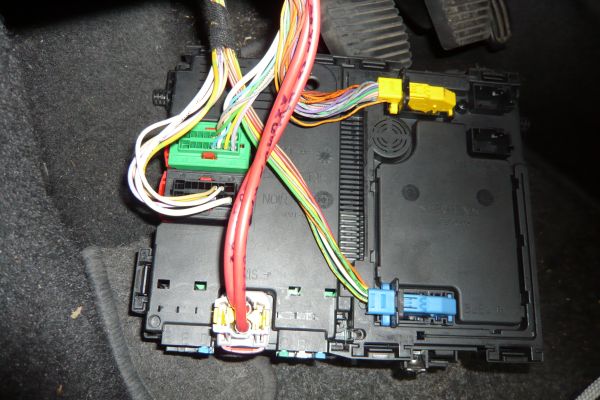
And if so do you have these with the other SH shunts in it?
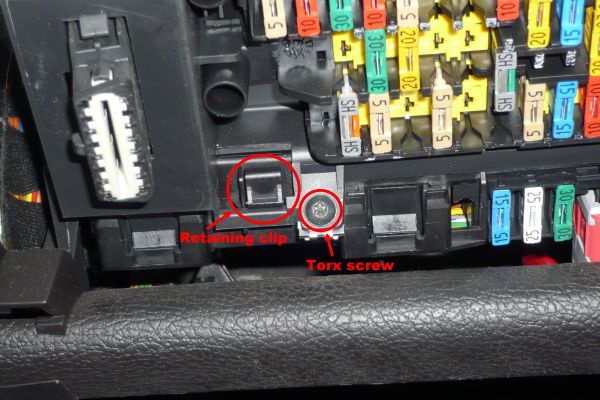
Not only are there all these fuses, there's a fusebox in the engine bay and if you pull it out of its box by releasing the tabs there's more massive fuses underneath those too to check.
And if so do you have these with the other SH shunts in it?
Not only are there all these fuses, there's a fusebox in the engine bay and if you pull it out of its box by releasing the tabs there's more massive fuses underneath those too to check.
2003 03'reg Peugeot 206cc 1997cc Manual
-
gazza82

- Posts: 2129
- Joined: Sat Apr 23, 2011 8:41 pm
- Location: Buckinghamshire, UK
Re: Central Locking Not working
I think op said it was 2001 Y-reg so that would be pre-mux
Family Fleet: ex-Cayman Green 206 CC 2.0 LE, Indigo Blue 206 1.4 HDi Hatchback, Subaru BRZ Auto, Alfa Romeo MiTo
-
Ryan
- Posts: 14
- Joined: Sun Oct 04, 2015 8:27 pm
Re: Central Locking Not working
Hi guys, sorry for long delay getting back to you. just got back from working away.
what ill do is ill pull the BSI out and take some photos. Ill also take some photos of the fuse board. but the picture you attached looks just like mine. the orange and grey SH fuse is in location 1 and there is a space marked SH for the green and grey one. apart from I have a 5 amp fuse in line rather than the Shunt fuse as shown on the attached picture.
what ill do is ill pull the BSI out and take some photos. Ill also take some photos of the fuse board. but the picture you attached looks just like mine. the orange and grey SH fuse is in location 1 and there is a space marked SH for the green and grey one. apart from I have a 5 amp fuse in line rather than the Shunt fuse as shown on the attached picture.
-
IanL
- Posts: 1563
- Joined: Wed May 13, 2015 10:34 pm
- Location: Jersey, Channel Islands
Re: Central Locking Not working
I have the SEDRE (wiring diagrams software) and should be able to get the diagram for your fusebox and post it here, but I would need the Build Code (aka RPO, ORGA, DAM) (details here), and also the VIS (last eight characters of the VIN) to ensure I get the right one.
-
Ryan
- Posts: 14
- Joined: Sun Oct 04, 2015 8:27 pm
Re: Central Locking Not working
Hi guys, had no luck with this car. just had its MOT and its failed all over the place....I think I may have to admit defeat on this one.......I want to thank everyone for there advice and help. I'm off to buy another car now and I hope this one works out better! thanks again chaps. all the best. Ryan
-
Ryan
- Posts: 14
- Joined: Sun Oct 04, 2015 8:27 pm
Re: Central Locking Not working
Hi all, just a quick update. thought i'd just pop this one quick as It was started as "central locking not working"
It was the SH fuse! i couldn't locate one. so i made one out of an old 25amp blade fuse. just filled the pins down to fit the spacing.! plugged it in.............PING! everything works! memory on radio stays, clock, time, date etc....central locking works again and interior lights works too!
so a bit of closure for everyone on this issue.
it was a sodding Shunt fuse!
problem is now, I can't get the fob to work! but I'm just going to reset BSI and see if that works...but central locking is now working!
thanks gain everyone.
It was the SH fuse! i couldn't locate one. so i made one out of an old 25amp blade fuse. just filled the pins down to fit the spacing.! plugged it in.............PING! everything works! memory on radio stays, clock, time, date etc....central locking works again and interior lights works too!
so a bit of closure for everyone on this issue.
it was a sodding Shunt fuse!
problem is now, I can't get the fob to work! but I'm just going to reset BSI and see if that works...but central locking is now working!
thanks gain everyone.
-
IanL
- Posts: 1563
- Joined: Wed May 13, 2015 10:34 pm
- Location: Jersey, Channel Islands
Re: Central Locking Not working
The fob needs to be recognised by the car.
Programming the remote control
1 Switch off the ignition.
2 Switch the ignition on again.
3 Press the large button immediately for a
few seconds.
4 Switch off the ignition and remove
the remote control key from the
ignition lock. The remote control
is now working again
Programming the remote control
1 Switch off the ignition.
2 Switch the ignition on again.
3 Press the large button immediately for a
few seconds.
4 Switch off the ignition and remove
the remote control key from the
ignition lock. The remote control
is now working again
-
Ryan
- Posts: 14
- Joined: Sun Oct 04, 2015 8:27 pm
Re: Central Locking Not working
Yeah, tried that one....didnt work.....also tried this one
1. Ensure all doors are unlocked using the key.
2. Press and hold plip key button until LED stops flashing.
3. After releasing button, LED will light constantly.
4. Press the Plip Button once, and LED will extinguish.
5. Open the door and hold the Plip key near the Ignition switch, and press the plip button one time.
6. Turn the ignition ON, and wait 10 seconds then turn ignition OFF.
7. After 5 seconds, Plip should now operate.
that worked once! then didnt work again........changed battery.....noting......BSI?
1. Ensure all doors are unlocked using the key.
2. Press and hold plip key button until LED stops flashing.
3. After releasing button, LED will light constantly.
4. Press the Plip Button once, and LED will extinguish.
5. Open the door and hold the Plip key near the Ignition switch, and press the plip button one time.
6. Turn the ignition ON, and wait 10 seconds then turn ignition OFF.
7. After 5 seconds, Plip should now operate.
that worked once! then didnt work again........changed battery.....noting......BSI?